mybina PROJECTS NEAR ME
Find Projects Near You with Projects Near Me!
Ready to discover projects near you? From the navigation menu, click SEARCH and select PROJECTS NEAR ME to get started.
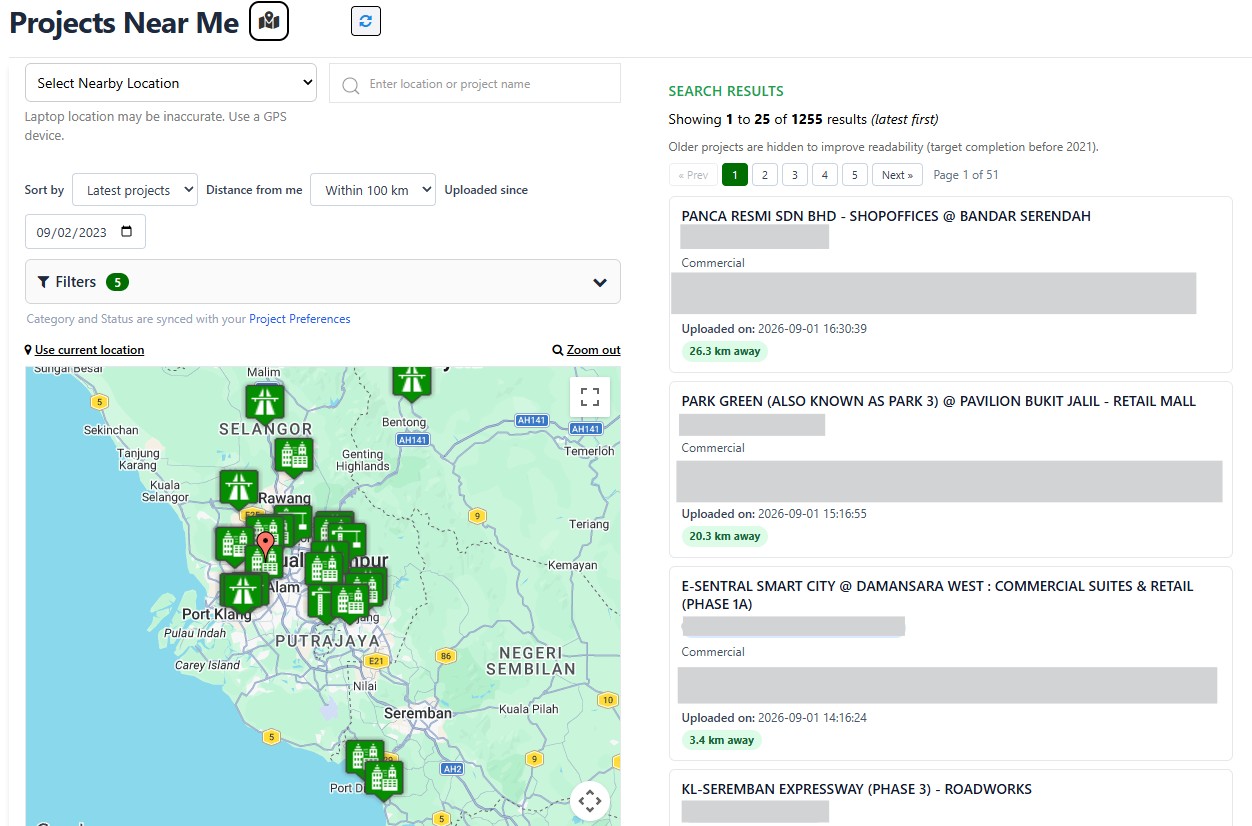
Wondering what projects are happening around your area? Projects Near Me makes it easy to discover and explore projects based on location — all in one convenient view.
When you open Projects Near Me, the latest projects are shown by default. From there, you can easily narrow down the results using the available filters to find exactly what you're looking for.
Search Your Way
Looking for a specific type of project or projects within a certain area? You can refine your search by:
• Nearby Location – Choose a nearby location to search around.
• Distance – Set how far you want to search from your location.
• Category – Filter projects by project type.
• State – Focus on projects in a specific state.
• Status – View projects based on their current status.
As long as your location setting is enabled, the project listing will also show the distance of each project from your current location, such as 5 km, 10 km, 25 km, 50 km or 100 km away.
Once you apply your filters, the project listing and map automatically update together, so you can easily see which projects match your search and where they are located.
Explore Projects on the List or Map
Found something interesting? You can click a project directly from the listing or select a project marker on the map to view its full Project Details.
Whether you're looking for new projects near you, exploring a particular state, or searching for a specific category or status, Projects Near Me gives you a simple way to discover projects that are relevant to you.
Search nearby. Check the distance. Explore the map. Discover your next project.